Pixelicious

The Secrets of a Successful Photo Blogging

  • Homepage
  • About us
  • Terms of Use
  • Contact
You are here: Home / Home

February 26, 2026 By Melinda Ward Leave a Comment

What Does Royalty Free Mean for Stock Images? A Clear Guide for Businesses and Creators


When buying stock images, the term royalty free appears everywhere—but it’s often misunderstood. Many people assume it means images are completely free or have no usage limits, which isn’t true. Understanding what royalty free really means is essential for using stock images legally and confidently in marketing, advertising, and digital projects.

Below is a clear, professional explanation of what royalty free means for stock images and how it affects your usage rights.

Understanding Royalty Free Stock Images

Royalty free means you pay a one-time fee to license an image and can then use it multiple times without paying additional royalties for each use. Instead of paying every time the image appears in a project, you receive broad usage rights upfront under specific license terms.

This licensing model is popular because it simplifies budgeting and reduces legal complexity. Many businesses choose royalty-free images for websites, social media, ads, presentations, and print materials.

However, royalty free does not mean unlimited ownership or unrestricted use. The image creator still owns the copyright.

What You Are Allowed to Do

With a standard royalty-free license, you can typically:

  • Use the image for commercial and personal projects
  • Include it in websites, blogs, ads, emails, and social media
  • Reuse the same image across multiple platforms
  • Edit, crop, or resize the image to fit your design

Platforms offering DepositPhotos Stock Photos provide detailed license agreements that clearly outline these permissions, helping users stay compliant while enjoying flexible usage.

What You Are Not Allowed to Do

Despite the flexibility, royalty-free licenses have clear restrictions. You generally cannot:

  • Resell or redistribute the image as a standalone file
  • Claim ownership or copyright of the image
  • Use images in logos, trademarks, or brand identities
  • Use images in sensitive or offensive contexts without proper releases

Some uses, such as high-volume merchandise or large-scale advertising, may require an extended license.

Royalty Free vs. Rights Managed

It’s important to distinguish royalty free from rights-managed licensing. Rights-managed images are licensed for specific uses, such as a single campaign, region, or time period. Any additional use requires a new license and fee.

Royalty-free images, on the other hand, allow repeated use without renegotiation, making them ideal for ongoing marketing and content creation.

Why Royalty Free Matters for Businesses

For startups, agencies, and content creators, royalty-free stock images offer predictable costs and legal peace of mind. You can scale campaigns, update designs, and reuse visuals without worrying about recurring fees.

Reputable libraries like Depositphotos clearly explain licensing terms, making it easier for businesses to choose images confidently and stay legally protected.

Final Thoughts

Royalty free does not mean “free of rules”—it means simple, flexible licensing. By understanding what is included and what is restricted, you can safely use stock images across projects without legal risk.

Before downloading any image, always review the license terms carefully. Doing so ensures your creative work remains both professional and compliant while maximizing the value of royalty-free stock photography.

April 24, 2025 By Melinda Ward Leave a Comment

Miami Modern Interior Design: Blending Tropical Luxury with Sleek Contemporary Style

Miami modern interior design captures the vibrant spirit of South Florida while embracing sleek contemporary aesthetics. From the iconic Art Deco influences to the bold tropical elements you’ll find in luxurious beachfront homes this distinctive style creates spaces that feel both sophisticated and refreshingly laid-back.

Whether you’re renovating your coastal retreat or simply want to infuse your home with Miami’s signature flair you’ll discover that this design approach celebrates clean lines natural materials and an effortless indoor-outdoor flow. The style expertly balances warmth with modernism incorporating elements like natural light geometric patterns and a carefully curated color palette that reflects the city’s dynamic energy and seaside atmosphere.

The Origins of Miami Modern Interior Design

Miami Modern interior design emerged in the 1940s as a distinctive architectural movement that combined modernist principles with tropical elements. This unique style transformed Miami’s landscape through innovative design approaches that reflected the city’s cultural evolution.

The Birth of MiMo Style

Miami Modern (MiMo) style originated in post-World War II Miami Beach, characterized by its dramatic angles, geometric patterns, and eye-catching structural elements. The style developed as architects adapted European modernism to Florida’s subtropical climate, incorporating large windows, brise-soleils, and sweeping curved walls. Notable architects Morris Lapidus and Norman Giller pioneered MiMo’s signature features, including sculptural staircases, terrazzo floors, and dramatic interior spaces that emphasized indoor-outdoor living.

Mid-Century Modern Meets Tropical Flair

Miami Modern interior design blends mid-century modern aesthetics with vibrant tropical influences. The style features:

  • Clean-lined furniture pieces in teak, walnut, or rosewood materials
  • Geometric patterns inspired by maritime elements like waves and nautical symbols
  • Bold accent colors drawn from Miami’s natural palette: coral, turquoise, palm green
  • Floor-to-ceiling windows maximizing natural light and ocean views
  • Terrazzo flooring paired with natural stone elements
  • Statement lighting fixtures featuring brass or chrome finishes
  • Built-in planters bringing tropical greenery indoors

The design approach integrates iconic mid-century pieces with custom elements that capture Miami’s beachfront spirit. Local materials like coral rock, limestone, and native hardwoods create authentic connections to the region’s natural environment.

Key Elements of Miami Modern Design

Miami Modern interior design combines bold aesthetics with functional elements to create sophisticated spaces. The style incorporates distinctive features that reflect the city’s vibrant culture.

Bold Color Palettes

Miami Modern interiors embrace vibrant color combinations inspired by South Beach’s Art Deco architecture. A typical palette includes:

  • Coral pinks paired with crisp whites for a fresh coastal feel
  • Deep teals mixed with metallic accents
  • Soft neutrals punctuated by bold tropical hues
  • Sunset oranges combined with ocean blues
  • White-on-white schemes with pops of vibrant accent colors

Statement Lighting and Fixtures

Lighting plays a crucial role in Miami Modern interior design through dramatic installations:

  • Oversized pendant lights with geometric shapes
  • Sculptural chandeliers in brass or chrome finishes
  • LED strip lighting highlighting architectural details
  • Glass globe clusters creating visual interest
  • Wall sconces with clean lines mixed metals

Natural and Luxe Materials

Miami Modern spaces feature a thoughtful blend of materials:

  • Polished terrazzo flooring with metallic inlays
  • Natural stone surfaces in kitchens bathrooms
  • Textured wallcoverings with geometric patterns
  • Floor-to-ceiling windows framed in brushed metals
  • Exotic wood veneers contrasting with white walls
  • Marble surfaces paired with brass accents

Each material selection creates visual depth balance while maintaining the signature Miami Modern aesthetic through careful integration of textures finishes.

Merging Indoor and Outdoor Living

Miami Modern interior design excels at creating fluid transitions between interior and exterior spaces. The signature style emphasizes open floor plans that maximize natural light and embrace Florida’s tropical environment.

Bringing the Outside In

Miami Modern interiors incorporate natural elements through strategic design choices:

  • Install floor-to-ceiling windows to frame waterfront or garden views
  • Add tropical plants like Birds of Paradise or Monstera as living sculptures
  • Use organic materials such as coral stone feature walls or bamboo accents
  • Place oversized mirrors to reflect outdoor scenery and amplify natural light
  • Integrate water features like indoor fountains or reflecting pools
  • Select nature-inspired textiles with botanical prints or wave patterns

Creating Seamless Transitions

  • Install retractable glass walls that open completely to patios
  • Extend interior flooring materials to outdoor spaces using weather-resistant options
  • Create covered outdoor rooms with similar furnishings as indoor spaces
  • Position furniture to face both interior and exterior views
  • Use consistent color palettes that flow from inside to outside
  • Add outdoor kitchens and living areas that mirror interior functions
  • Design lighting schemes that illuminate both spaces uniformly
Design Element Indoor Application Outdoor Extension
Flooring Terrazzo or marble Textured porcelain tiles
Furniture Clean-lined sofas Weather-resistant seating
Lighting Sculptural pendants LED landscape lighting
Materials Natural stone Marine-grade finishes

Contemporary Miami Modern Spaces

Contemporary Miami Modern spaces celebrate luxurious minimalism with a focus on clean lines and open layouts. These spaces embody the essence of modern Miami living through thoughtful design elements and sophisticated spatial planning.

Open Floor Plans

Miami Modern interiors maximize space through expansive open floor plans that create uninterrupted sight lines from room to room. The seamless flow eliminates visual barriers between living spaces dining areas and kitchens through:

  • Strategic furniture placement that defines distinct functional zones
  • Floating partitions or decorative screens for subtle space division
  • Consistent flooring materials like terrazzo or large-format tiles
  • Built-in storage solutions that maintain clean sight lines
  • Strategic lighting placement to highlight architectural features

Minimalist Furnishings

The furnishing approach in Miami Modern spaces emphasizes quality over quantity with carefully curated pieces:

  • Low-profile sofas in neutral tones with clean geometric shapes
  • Statement accent chairs featuring sculptural forms
  • Glass or marble coffee tables with sleek metal frames
  • Built-in benches along window walls to maximize views
  • Multi-functional storage pieces with hidden compartments
  • Floating media units that maintain visual lightness
  • Minimal window treatments using automated roller shades
Furniture Type Recommended Spacing Clearance Needed
Seating Groups 8-10 feet apart 36 inches
Coffee Tables 14-18 inches from sofa 30 inches
Dining Tables 42-48 inches from walls 36 inches

Incorporating Miami Modern Style

Miami Modern style integration combines distinctive decorative elements with Art Deco influences to create sophisticated interiors. The style focuses on balancing bold statements with refined elegance.

Signature Decorative Touches

Enhance Miami Modern spaces with strategic decorative elements:

  • Layer geometric patterns through textiles like throw pillows in wave motifs or abstract designs
  • Display sculptural vases in brushed brass or chrome finishes on minimalist console tables
  • Add dimensional wall panels featuring curved or angular reliefs in neutral tones
  • Install statement mirrors with metallic frames that reflect natural light
  • Place tropical plants in sleek planters to bring organic shapes into angular spaces
  • Position accent lighting with artistic bases as functional sculptures
  • Incorporate terrazzo elements through side tables or decorative objects

Art Deco Influences

  • Symmetrical arrangements of furniture pieces around focal points
  • Stepped forms in architectural details or built-in shelving units
  • Sunburst patterns integrated into mirrors or wall art
  • Chrome accents on furniture legs or lighting fixtures
  • Curved furniture silhouettes balanced with straight lines
  • Contrasting materials like glass against textured surfaces
  • Bold geometric patterns in area rugs or upholstery fabrics
  • Streamlined forms in seating pieces with clean profiles
Art Deco Feature Modern Interpretation
Zigzags Subtle wall textures
Metallic finishes Brushed brass details
Bold colors Muted tropical tones
Heavy ornaments Minimalist patterns

Conclusion

Miami Modern interior design offers you the perfect blend of sophistication and relaxed coastal living. By embracing clean lines natural materials and thoughtful indoor-outdoor transitions you’ll create spaces that capture the essence of South Florida’s vibrant spirit.

Whether you’re drawn to the bold geometric patterns luxurious minimalism or the seamless integration of tropical elements MiMo design provides endless possibilities to express your personal style while maintaining its signature aesthetic. Start incorporating these timeless elements today and transform your space into a Miami Modern haven that you’ll love for years to come.


March 15, 2025 By Melinda Ward Leave a Comment

DepositPhotos Review 2024: Best Stock Photo Platform for Content Creators

Finding high-quality stock photos and images for our creative projects has never been easier thanks to DepositPhotos. With over 240 million files in their library we’ve discovered a vast collection of visuals that cater to every professional need.

We’ll explore how DepositPhotos stands out in the crowded stock photo marketplace offering everything from stunning photographs and vectors to video footage. Whether you’re a digital marketer blogger web designer or content creator this platform provides flexible licensing options and competitive pricing that make premium visual content accessible to businesses of all sizes.

What Is DepositPhotos?

DepositPhotos operates as a global marketplace for high-quality stock media content, serving over 29 million customers worldwide. This platform connects creative professionals with a vast library of visual assets for commercial and editorial use.

Key Features and Services

  • Extensive Media Library: Access to 240+ million files including photos vectors illustrations videos
  • Advanced Search Tools: Filter results by color orientation size category technical parameters
  • AI-Powered Features: Smart search functionality detects objects faces colors compositions
  • Multiple File Formats: Download options in JPEG PNG EPS MP4 MOV formats
  • Usage Analytics: Track downloads usage history licensing information
  • Mobile Accessibility: Full-featured mobile app for iOS Android devices
  • Contributor Platform: Upload sell create distribute original content

Pricing Plans and Packages

Plan Type Features Best For
On-Demand 10-750 downloads Small projects
Monthly Subscription 30-unlimited downloads Regular content needs
Enterprise Custom solutions Large organizations
  • Flexible Payment Options

  • Pay-as-you-go credits
  • Monthly subscriptions
  • Annual memberships
  • Enterprise packages
  • Licensing Types

  • Standard license
  • Extended license
  • Editorial use
  • Custom agreements
  •  
  • Bulk purchase savings
  • Team account benefits
  • Corporate rates
  •  

Image Quality and Selection

DepositPhotos maintains strict quality standards for its visual content library, ensuring every asset meets professional requirements for commercial use. The platform’s extensive collection undergoes thorough review processes to verify technical specifications and creative excellence.

Photo Categories and Collections

DepositPhotos organizes images into 35+ main categories including architecture, business, nature, technology and lifestyle. Each category features:

  • Curated Collections: Hand-picked selections of thematically linked images
  • Seasonal Galleries: Updated content for holidays events and current trends
  • Editorial Sets: News media photos from global events sports entertainment
  • Blog-Ready Images: Optimized sizes resolutions for digital publishing
  • Exclusive Content: Unique photos available only through DepositPhotos

Vector Graphics and Illustrations

The vector graphics library contains professionally designed assets in multiple formats:

  • Scalable Vector Graphics (SVG): Infinitely resizable without quality loss
  • Adobe Illustrator Files (AI): Fully editable professional illustrations
  • EPS Format: Print-ready vector graphics for commercial applications
  • Icon Sets: Comprehensive collections of UI elements symbols logos
  • Infographic Templates: Data visualization ready-made designs
Feature Specification
Resolution Up to 8000×8000 px
File Types AI, EPS, SVG, PDF
Color Modes RGB CMYK
Previews PNG JPG formats
Layers Organized editable

Licensing and Usage Rights

DepositPhotos offers comprehensive licensing options that protect both content creators and users. The platform’s licensing structure ensures clear usage rights while maintaining copyright compliance across different content applications.

Standard vs. Extended Licenses

Standard licenses on DepositPhotos cover basic usage rights for blog images, digital marketing materials and web content with specific limitations:

  • Print runs up to 500,000 copies
  • Digital usage on websites with up to 500,000 monthly views
  • Social media posts with restricted sharing capabilities
  • One-time use in presentations or documents
  • Single-user authorization

Extended licenses provide broader commercial rights:

  • Unlimited print runs
  • Merchandise creation and resale
  • Templates for distribution
  • Multiple-seat usage authorization
  • Unlimited digital impressions

Legal Considerations

  • Model releases for images containing identifiable people
  • Property releases for trademarked locations or products
  • Attribution requirements based on usage type
  • Geographic restrictions for certain content categories
  • Time limitations on editorial content use
License Type Print Run Limit Digital Views Commercial Use
Standard 500,000 500,000 Limited
Extended Unlimited Unlimited Full Rights

User Experience and Interface

DepositPhotos features an intuitive interface designed for efficient visual content discovery. The platform’s user-centric design streamlines the process of finding, selecting, and downloading stock photos for various creative projects.

Search and Filter Options

The search functionality incorporates multiple filtering tools to narrow down specific image requirements:

  • Advanced filters for orientation, people count, color schemes, and file type
  • Smart search suggestions that auto-populate based on popular queries
  • Category-based browsing with 35+ predefined collections
  • Similar image search using visual recognition technology
  • Price range filters to match budget constraints
  • Resolution and file size specifications for precise requirements

Download Process

The platform offers a straightforward 3-step download system:

  1. Preview Options
  • High-resolution previews with watermarks
  • Detailed image specifications
  • Similar content suggestions
  • Licensing information display
  1. Purchase Methods
  • One-click download with subscription plans
  • Credit-based purchases for single images
  • Bulk download capabilities for multiple selections
  • Shopping cart functionality for batch processing
  1. File Delivery
  • Instant download availability
  • Multiple file format options
  • Size variants for different applications
  • Download history tracking
  • Cloud storage integration for enterprise users

The interface incorporates dedicated sections for blog images with preset dimensions and formats suitable for digital publishing. Each download includes essential metadata, making it easier to organize and utilize stock photos across different projects.

Contributor Platform

DepositPhotos enables photographers, illustrators, and videographers to monetize their creative work through a robust contributor platform. The platform maintains strict quality standards while providing contributors with tools to manage their portfolios efficiently.

Selling Your Content

Contributors upload high-resolution images, vectors, or videos through DepositPhotos’ intuitive submission interface. Each file undergoes a thorough review process focusing on technical quality, commercial value, and legal compliance. The platform accepts:

  • Digital photographs at 4MP minimum resolution
  • Vector illustrations in AI, EPS, or SVG formats
  • 4K video footage in standard formats
  • Editorial content with proper documentation
  • Commercial content with model releases

Earnings and Payouts

Contributors earn revenue through a tiered commission structure based on lifetime sales volume. The platform offers:

Sales Level Commission Rate
Entry Level 34% per sale
Mid-Level 36-42% per sale
Expert Level Up to 45% per sale

Payment options include:

  • Monthly direct deposits for balances over $50
  • PayPal transfers with minimal fees
  • Wire transfers for international contributors
  • Skrill payments in multiple currencies

The platform tracks sales metrics through a detailed dashboard, providing real-time earnings data and download statistics. Contributors receive payments between the 1st and 15th of each month for the previous month’s sales.

DepositPhotos vs. Competitors

DepositPhotos stands out in the competitive stock photo marketplace through distinct pricing advantages. The platform’s combination of extensive content libraries diverse licensing options creates a compelling value proposition for content creators.

Price Comparison

DepositPhotos offers more competitive rates compared to major competitors:

Platform Single Image Monthly Subscription (100 images) Annual Subscription
DepositPhotos $9.99 $69 $699
Shutterstock $14.50 $99 $999
iStock $12 $79 $799
Adobe Stock $9.99 $79.99 $799.99

Key pricing advantages include:

  • Bulk purchase discounts up to 30% off standard rates
  • Flexible credit packages starting at $49
  • Regular promotional offers for first-time buyers
  • No hidden fees or mandatory subscriptions

Content Library Size

DepositPhotos maintains a robust content library that competes effectively with industry leaders:

Platform Total Assets Image Files Vector Files Video Files
DepositPhotos 240M+ 190M+ 28M+ 22M+
Shutterstock 400M+ 320M+ 40M+ 40M+
Adobe Stock 300M+ 250M+ 30M+ 20M+
Alamy 310M+ 290M+ 10M+ 10M+
  • 35+ main categories for easy navigation
  • 500,000+ new files added monthly
  • Dedicated blog images section with preset dimensions
  • 4K video content availability
  • High-resolution vector graphics collection

Conclusion

We’ve explored how DepositPhotos stands as a comprehensive solution for creative professionals seeking high-quality visual content. The platform’s vast library combined with competitive pricing makes it an attractive choice for businesses and content creators alike.

With flexible licensing options advanced search capabilities and a user-friendly interface DepositPhotos delivers exceptional value. The platform’s commitment to quality and continuous growth ensures users have access to fresh content that meets professional standards.

Whether you’re a blogger marketer or enterprise user DepositPhotos offers the tools and resources needed to bring your creative projects to life. Their contributor program also provides opportunities for artists to monetize their work while maintaining fair compensation standards.


March 13, 2025 By Melinda Ward Leave a Comment

How to Use Blog Images: A Complete Guide to Boost Engagement and Traffic [2024]

Visual content has become essential in modern blogging as we navigate an increasingly image-driven digital landscape. From eye-catching featured images to informative infographics our readers expect more than just plain text when consuming online content.

We’ve discovered that blogs with relevant high-quality images receive 94% more views than those without visuals. When we incorporate the right images they don’t just make our content more appealing – they help convey complex information break up text and keep readers engaged throughout the article. Plus they’re perfect for sharing on social media platforms where visual content rules supreme.

In this guide we’ll explore everything you need to know about selecting creating and optimizing blog images that’ll transform your content from good to outstanding. We’ll share proven strategies for sourcing images best practices for optimization and tips for maintaining brand consistency across your visual elements.

Why Blog Images Matter for Engagement

Blog images transform content from plain text into visually compelling stories that capture reader attention. Strategic use of images creates an immediate visual hierarchy that guides readers through content effortlessly.

Visual Impact on Reader Experience

High-quality blog images create distinct emotional connections with readers through visual storytelling. Images break up text blocks into scannable segments while adding contextual depth to written content. Professional photos from trusted sources like Alamy Stock Photos enhance content credibility by maintaining consistent visual standards across blog posts.

Key visual impacts include:

  • Creates instant emotional resonance
  • Improves information retention by 65%
  • Reduces perceived reading time
  • Establishes brand recognition
  • Maintains reader attention spans

Statistics Behind Image Performance

Research data demonstrates the measurable impact of images on blog performance:

Metric Impact
Engagement Rate +94% for posts with images
Social Shares +150% with relevant visuals
Time on Page +88% with optimized images
Information Recall +65% after 3 days
Click-through Rate +37% increase

Image sources like DepositPhotos provide diverse visual options that enhance these metrics through:

  • Professional-quality photographs
  • Relevant illustrations
  • Infographic elements
  • Custom graphics
  • Brand-consistent visuals

The data confirms that blogs featuring strategically placed images outperform text-only content across all engagement metrics. Incorporating high-resolution photos from reputable stock image providers ensures professional presentation while maximizing reader interaction.

Types of Blog Images That Drive Results

Blog images enhance content engagement through strategic placement and purposeful design. Different image types serve distinct functions in capturing reader attention and conveying information effectively.

Featured Images and Headers

Featured images create the first visual impression of blog posts across various platforms. These hero images appear prominently at the top of posts and in social media previews, making high-quality stock photos from sources like DepositPhotos essential for maintaining professional standards. Effective header images incorporate relevant visual elements with adequate space for text overlay while adhering to consistent brand aesthetics.

In-Post Photography

In-post photographs break up text blocks and provide visual context to written content. Original photography showcases authentic brand personality while curated stock images from platforms like Alamy Stock Photos offer professional alternatives. Key placement points include:

  • Supporting statistics or data points
  • Illustrating step-by-step processes
  • Highlighting product features
  • Demonstrating real-world applications
  • Breaking up long-form content sections

Infographics and Data Visualization

Infographics transform complex information into digestible visual formats. These custom graphics present:

  • Statistical comparisons
  • Process workflows
  • Timeline progressions
  • Survey results
  • Industry trends
  • Feature breakdowns

Data visualizations incorporate charts graphs or diagrams to illustrate numerical relationships or conceptual hierarchies. Custom-designed infographics maintain brand consistency while presenting information in an engaging visual format that readers can quickly comprehend and share.

Best Practices for Blog Image Selection

Selecting appropriate blog images requires attention to technical specifications visual appeal. Our comprehensive criteria ensure images enhance content quality while maintaining professional standards across digital platforms.

Image Quality Requirements

High-resolution images form the foundation of professional blog content. Here’s what we look for:

  • Select images with a minimum resolution of 1200×800 pixels for optimal display
  • Use photos with clear focus sharp details
  • Check image files remain under 500KB to maintain fast loading times
  • Choose images with proper lighting balanced exposure
  • Verify photos display correctly across multiple screen sizes
  • Source images from reputable providers like DepositPhotos for guaranteed quality

Relevance and Context

Images connect directly with the surrounding content through:

  • Match visual elements to specific article sections topics
  • Include recognizable objects subjects that illustrate key points
  • Position images near related text paragraphs
  • Add descriptive alt text that reinforces content meaning
  • Select photos that reflect current trends industry standards
  • Incorporate lifestyle images that resonate with target audiences

Branding Consistency

  • Apply consistent color schemes across all visuals
  • Use similar photographic styles lighting techniques
  • Follow predetermined image dimensions aspect ratios
  • Include logo watermarks when appropriate
  • Match visual tone to brand personality voice
  • Create templates for recurring image types blog features
Image Quality Metrics Minimum Requirements
Resolution 1200×800 pixels
File Size Under 500KB
Format JPG PNG WebP
Color Depth 24-bit
DPI 72-96

Image Optimization Essentials

Image optimization transforms blog images into high-performing digital assets that enhance website performance without sacrificing visual quality. Our comprehensive optimization approach focuses on three critical aspects that maximize image effectiveness for blogs.

File Size and Loading Speed

Blog images require compression to maintain fast loading speeds while preserving visual quality. We compress images to 100-200KB for standard blog posts using modern formats like WebP alongside traditional JPEG files. Here’s a data-driven approach to file optimization:

Image Type Recommended Size Format Compression Level
Featured Images 200-300KB WebP/JPEG 60-70%
In-Post Photos 100-200KB WebP/JPEG 70-80%
Thumbnails 50-100KB WebP/JPEG 80-85%

Alt Text and SEO Benefits

Alt text optimization enhances image searchability while improving accessibility. Each blog image includes descriptive alt text containing 8-12 words that incorporate relevant keywords naturally. Example format:

  • Primary keyword + descriptive action
  • Subject + context + setting
  • Specific details without keyword stuffing

Mobile Responsiveness

Mobile optimization ensures images display correctly across all devices. We implement responsive image techniques:

  • Define multiple image sizes using srcset attributes
  • Set appropriate viewport dimensions
  • Create breakpoints at 768px 1024px 1440px
  • Maintain aspect ratios using modern CSS
  • Load smaller versions for mobile devices

Our optimization strategy preserves image quality while ensuring fast loading speeds on both desktop and mobile platforms. Each technique directly impacts user experience metrics including bounce rates time on page.

Legal Considerations for Blog Images

Legal compliance in blog image usage protects content creators from copyright infringement claims. Understanding image rights ensures proper attribution practices align with intellectual property laws.

Copyright and Usage Rights

Blog images fall under specific copyright protections that regulate their usage across digital platforms. Stock photo services like Alamy Photos DepositPhotos provide licensed images with clear terms of use. Here’s what to consider:

  • Purchase appropriate licenses for commercial blog usage
  • Review license duration periods before publishing images
  • Check territorial restrictions on image usage rights
  • Verify model releases for photos containing identifiable people
  • Document license numbers for each purchased image

Image Attribution Guidelines

Attribution requirements vary based on image source licensing agreements. Here’s how to properly credit images:

  • Include photographer name location beneath images
  • Add source links to stock photo platforms
  • Format credits as “Image by [Creator] via [Platform]”
  • Place attribution within image captions
  • Maintain attribution records in content management systems
License Type Attribution Required Commercial Use Allowed
Royalty-Free No Yes
Creative Commons Yes Varies by license
Rights-Managed Case-specific Yes with limitations
Editorial Yes Limited usage

Note: This table represents common license types but specific requirements vary by platform.

Tools and Resources for Blog Images

Professional blog images require reliable sources for high-quality visuals and robust editing tools. Here’s a comprehensive overview of essential resources for creating stunning blog imagery.

Stock Photo Websites

Stock photo platforms provide extensive libraries of professional images for blog content. Here are top-rated platforms with diverse image collections:

  • Shutterstock: Contains 400+ million images with advanced search filters
  • Adobe Stock: Integrates seamlessly with Creative Cloud apps
  • Alamy: Offers 300+ million editorial images with historical archives
  • DepositPhotos: Features 230+ million royalty-free images at competitive prices
  • Unsplash: Provides free high-resolution photos with Creative Commons licenses
Platform Image Library Size Pricing Model
Shutterstock 400M+ Subscription/Credit
Adobe Stock 300M+ Subscription
Alamy 300M+ Per Image
DepositPhotos 230M+ Subscription/Credit
Unsplash 3M+ Free

Image Editing Software

  • Adobe Photoshop: Industry-standard software for advanced photo manipulation
  • Canva: Browser-based editor with pre-made blog templates
  • GIMP: Free open-source alternative with professional features
  • Snapseed: Mobile editing app for quick photo enhancements
  • Lightroom: Specialized tool for color correction adjustments
Software Key Features Platform
Photoshop Layer editing, filters Desktop
Canva Templates, drag-drop Web/Mobile
GIMP Photo manipulation Desktop
Snapseed Quick editing Mobile
Lightroom Color grading Desktop/Mobile

Conclusion

We’ve explored how strategic use of blog images can transform your content from basic text into engaging visual stories. Carefully selected visuals boost engagement rates build emotional connections and significantly increase social shares.

By following image optimization best practices adhering to legal requirements and utilizing the right tools you’ll create a more compelling blog that resonates with your audience. Remember that high-quality relevant images aren’t just decorative elements – they’re essential components of successful content marketing.

Take action today to elevate your blog’s visual appeal and watch your engagement metrics soar. The data speaks for itself: investing time in proper image selection and optimization directly correlates to better reader engagement and content performance.


March 10, 2025 By Melinda Ward Leave a Comment

How to Buy Alamy Stock Photos: A Complete Guide to Licensing and Pricing [2024]

Finding the perfect stock photo can transform our digital content from ordinary to extraordinary. When it comes to professional stock photography Alamy stands out as one of the leading platforms with over 300 million images in its vast library.

We’ll explore how to navigate Alamy’s marketplace to purchase high-quality photos that’ll enhance our projects. From understanding licensing options to making smart decisions about image resolution we’ll guide you through the essential steps of buying stock photos on this trusted platform. Whether we’re working on a commercial campaign a blog post or a creative project Alamy’s diverse collection offers something for every need.

What Is Alamy and Its Image Library

Alamy stands as a leading stock photography marketplace established in 1999, hosting over 300 million images from 150,000 photographers worldwide. The platform operates as a direct bridge between content creators and photographers, ensuring high-quality visual content for various professional needs.

Types of Photos Available

Alamy’s extensive library offers diverse image categories:

  • Editorial images from news events, celebrities, sports competitions
  • Commercial photographs of business settings, lifestyle scenes, architecture
  • Nature shots featuring landscapes, wildlife, environmental subjects
  • Historical collections containing vintage photographs, archival documents
  • Fine art reproductions of paintings, sculptures, artistic installations
  • Blog images optimized for digital content creation
  • Documentary photographs capturing social issues, cultural events
  • Aerial photography showing cityscapes, geographical features

License Options and Rights

  • Rights-Managed (RM)
  • Exclusive usage rights
  • Time-specific limitations
  • Geographic restrictions
  • Industry-specific applications
  • Royalty-Free (RF)
  • Multiple-use permissions
  • No time restrictions
  • Worldwide usage rights
  • Multi-project applications
  • Editorial Licenses
  • News reporting purposes
  • Documentary usage
  • Non-commercial applications
  • Educational content
License Type Usage Period Geographic Scope Price Range
Rights-Managed Limited Specified Region $50-$500+
Royalty-Free Unlimited Worldwide $20-$200
Editorial Project-Based Unrestricted $20-$250

Pricing Structure for Alamy Photos

Alamy’s pricing system offers flexible options for purchasing stock photos based on image size license type. We’ll break down the costs associated with standard licenses extended licenses to help you make informed purchasing decisions.

Standard License Costs

Standard licenses for Alamy stock photos start at $19.99 for web-resolution images (72 dpi) up to 1600px. Here’s the complete pricing breakdown:

Image Size Resolution Price (USD)
Web 1600px, 72dpi $19.99
Small 3000px, 300dpi $49.99
Medium 6000px, 300dpi $129.99
Super 9000px, 300dpi $199.99

Standard licenses cover most common uses including blog images marketing materials single print runs under 250,000 copies.

Extended License Fees

Extended licenses provide additional usage rights with corresponding price ranges:

License Type Usage Rights Price Range (USD)
Marketing Unlimited print runs $499 – $999
Digital Multiple websites apps $399 – $799
Merchandise Products for resale $599 – $1,299
Broadcast TV streaming media $799 – $1,499

All extended licenses include high-resolution files unlimited print runs multiple seat licenses. Prices vary based on specific usage requirements territory coverage duration of use.

Note: Prices listed are subject to change. Volume discounts are available for bulk purchases corporate accounts.

How to Search and Purchase Images

Finding the perfect Alamy stock photo requires a systematic approach to navigate through millions of available images. Here’s how to optimize your search and complete your purchase efficiently.

Creating an Account

The first step in buying Alamy stock photos involves setting up a free account. Here’s the account creation process:

  1. Click the “Register” button in the top-right corner
  2. Enter your email address business details
  3. Create a secure password
  4. Select your preferred currency for transactions
  5. Verify your email address through the confirmation link

Using Advanced Search Filters

Alamy’s advanced search features help narrow down specific images from their vast collection:

  1. Keywords
  • Enter multiple terms separated by commas
  • Use quotation marks for exact phrases
  • Add minus signs to exclude specific terms
  1. Image Type
  • Photos
  • Vectors
  • Illustrations
  • 360-degree images
  1. Technical Specifications
  • Resolution preferences
  • Orientation (landscape portrait)
  • Color or black white
  • File format (JPEG TIFF)
  1. License Options
  • Rights-managed
  • Royalty-free
  • Editorial use
  • Commercial use
  1. Date Range
  • Recently added
  • Specific time periods
  • Historical archives
  • Relevance
  • Date added
  • Price range
  • Popularity
  • Image size

Image Quality and Resolution Options

Alamy provides multiple image quality options to match specific usage requirements for stock photos. Each resolution level delivers optimal visual clarity based on the intended application.

Standard vs High-Resolution Downloads

Standard downloads offer web-optimized images at 1600px on the longest side, perfect for blog images and digital content. High-resolution downloads provide full-size images up to 8688 x 5792 pixels, ideal for large-format printing and professional publishing. Here’s a comparison of available resolutions:

Resolution Type Image Size Best Used For
Standard 1600px Websites, blogs, social media
Mid-size 3000px Small prints, presentations
High-res 8688px Commercial printing, billboards

File Format Choices

Alamy stock photos come in multiple file formats to accommodate different project needs:

  • JPEG files feature compressed images optimal for web use
  • TIFF files maintain maximum quality for professional printing
  • PNG files preserve transparency for graphic design work
  • RAW files provide extensive editing capabilities for specific images

Each format includes embedded color profiles ensuring consistent reproduction across devices. Download sizes range from 2MB for web-resolution JPEGs to 50MB+ for high-resolution TIFFs.

Alamy’s Licensing Terms and Usage Rights

Alamy’s licensing agreements outline specific terms for using purchased stock photos across different media platforms. Understanding these terms ensures compliance with legal requirements when buying Alamy stock photos.

Commercial vs Editorial Use

Commercial licenses permit the use of images in advertising, marketing materials, product packaging or promotional content. Editorial licenses restrict usage to news reporting, educational materials or non-commercial blog images with these key differences:

  • Commercial licenses require model releases for recognizable people
  • Editorial images document real events without alterations
  • Commercial usage allows modifications like cropping or color adjustments
  • Editorial content maintains journalistic integrity with minimal editing
  • Commercial licenses protect against trademark infringement claims

Territory and Duration Restrictions

Image licenses include geographic and time limitations that define where and how long the content remains usable:

Territory Options:

  • Single country use
  • Continental region coverage
  • Worldwide rights
  • Web-only distribution

Duration Terms:

  • 1-year limited period
  • 3-year extended usage
  • 5-year comprehensive rights
  • Perpetual licenses for unlimited time

Licenses specify permitted territories, ranging from single-country to worldwide usage. Duration options extend from 1-year terms to perpetual rights, with pricing adjusted accordingly based on scope and timeframe selected.

Payment Methods and Billing Process

Alamy accepts five primary payment methods for purchasing stock photos:

  • Credit cards (Visa, Mastercard, American Express)
  • PayPal transactions with verified accounts
  • Wire transfers for purchases over $500
  • Pre-paid credits through Alamy Account Credit system
  • Corporate purchase orders for approved business accounts

Payment Security

Alamy implements multiple security measures for safe transactions:

  • 256-bit SSL encryption for all payment processing
  • PCI DSS compliant payment gateway
  • Two-factor authentication for account protection
  • Automated fraud detection systems
  • Secure storage of payment information

Billing Process

The billing workflow follows these steps:

  1. Select desired images for purchase
  2. Choose license type for each image
  3. Add items to shopping cart
  4. Review order summary
  5. Enter payment details
  6. Receive instant download access

Account Credit System

Alamy’s prepaid credit system offers several benefits:

  • 10% bonus credit on deposits over $500
  • Faster checkout process for frequent purchases
  • Monthly billing statements for tracking
  • Credit validity for 12 months
  • Automatic email notifications for low balance
Credit Amount Bonus Credit Total Value
$500 $50 $550
$1,000 $100 $1,100
$2,500 $250 $2,750
$5,000 $500 $5,500

Invoice Management

  • Downloadable PDF invoices
  • Itemized purchase history
  • Tax documentation
  • Currency conversion rates
  • Transaction reference numbers
  • Historical billing records

Downloading and Managing Purchased Images

Accessing Downloads

After purchasing Alamy stock photos, accessing downloads occurs through the “Downloads” section in your account dashboard. Every purchased image receives a unique download link valid for 14 days. Downloading options include:

  • Direct download to your device
  • Cloud storage transfer to Dropbox or Google Drive
  • Bulk download for multiple images using Alamy’s download manager

Image Organization

Alamy’s digital asset management system helps organize purchased images through:

  • Custom folders for project categorization
  • Searchable metadata tags
  • Download history tracking
  • Purchase date sorting
  • License expiration monitoring

File Management Tools

The platform provides essential file management features:

  • Re-download access for 14 days
  • Image version control
  • File format conversion options
  • Resolution adjustment tools
  • Batch renaming capabilities

Storage Requirements

Image storage specifications include:

Resolution Type File Size Storage Needed
Web Resolution 1-3 MB 500 MB
Mid Resolution 5-15 MB 2 GB
High Resolution 20-50 MB 5 GB

Backup Options

  • Cloud storage integration
  • Local backup recommendations
  • External drive archiving
  • Automated backup scheduling
  • Recovery options for expired downloads

Conclusion

We’ve navigated through Alamy’s robust platform detailing everything from licensing options to image management. With its vast collection of over 300 million high-quality images and flexible purchasing options Alamy stands as a reliable choice for content creators.

The platform’s secure payment system comprehensive licensing terms and user-friendly interface make finding and purchasing the perfect stock photo straightforward. Whether you need images for commercial campaigns blog posts or creative projects Alamy’s marketplace offers the tools and resources to meet your specific needs.

Remember to consider your project requirements carefully when selecting image resolutions and licenses. This will help you make cost-effective decisions while ensuring you have the right permissions for your intended use.


December 26, 2024 By Melinda Ward Leave a Comment

How to Draw Beautiful Nature Images: A Step-by-Step Guide for Beginners

Drawing nature offers a wonderful way to connect with the world around us while developing our artistic skills. Whether we’re sketching landscapes mountains or capturing the delicate details of flowers we’ll discover that nature provides endless inspiration for our artwork.

We’ve put together this comprehensive guide to help both beginners and intermediate artists master the fundamentals of nature drawing. From selecting the right materials to understanding basic techniques like shading and perspective we’ll walk through everything needed to create stunning natural scenes on paper.

Essential Art Supplies For Nature Drawing

Creating detailed nature images requires specific art materials that enhance the drawing experience and final results. Here’s a comprehensive guide to selecting the right supplies for nature drawing.

Choosing The Right Paper

Cold-pressed watercolor paper provides optimal texture for nature drawings with its slightly rough surface. Select paper weights between 140-300 lb for versatility across different drawing techniques. Here are the key paper characteristics to consider:

  • Texture: Medium tooth paper captures fine details in leaves branches branches
  • Size: 9×12 inch pads offer portability for outdoor sketching sessions
  • Material: 100% cotton paper resists buckling from multiple erasing layers
  • Brightness: Natural white papers show true colors without affecting tones
  • Durability: Acid-free papers prevent yellowing over time
  • Graphite Pencils: HB to 6B range for varied line weights shadows
  • Fine-tip Pens: 0.1mm to 0.5mm for detailed leaf veins textures
  • Brush Pens: Flexible tips create organic flowing lines
  • Colored Pencils: Layerable options for realistic nature colors
  • Erasers: Kneaded vinyl types for precise detail removal
  • Drawing Board: Portable rigid surface for outdoor sketching
  • Pencil Sharpener: Manual sharpener maintains precise points
Tool Type Recommended Range Primary Use
Graphite HB – 6B Basic sketching
Fine-tip Pens 0.1 – 0.5mm Detail work
Brush Pens Medium – Large Organic lines
Colored Pencils 12 – 24 set Color layering

Basic Drawing Techniques

Basic drawing techniques form the foundation for creating realistic nature images. These fundamental skills enable artists to capture the essence of natural elements with precision and authenticity.

Understanding Perspective

Perspective in nature drawings creates a sense of space and dimension. Linear perspective uses converging lines to show distance, while atmospheric perspective demonstrates depth through gradual fading of details and colors. Here’s how to master perspective in nature drawings:

  • Start with a horizon line to establish the viewer’s eye level
  • Place larger objects in the foreground with detailed textures
  • Draw smaller objects in the background with less detail
  • Create overlapping elements to show spatial relationships
  • Use size variation to indicate distance between objects
  • Apply lighter pressure for distant elements
  • Position reference points to maintain proper scale
  • Layer different pencil strokes to create bark textures
  • Use stippling for rough surfaces like rocks or tree trunks
  • Apply crosshatching for shadows in foliage
  • Create smooth gradients for sky and water surfaces
  • Incorporate negative space to highlight natural forms
  • Vary line weight to emphasize foreground elements
  • Add cast shadows to ground objects
  • Use burnishing techniques for glossy leaves
  • Apply pressure variations for subtle texture changes
Technique Purpose Application
Crosshatching Creates shadows Foliage, tree trunks
Stippling Adds texture Rocks, bark patterns
Blending Smooth transitions Sky, water surfaces
Layering Builds depth Background elements
Burnishing Glossy effects Leaves, smooth surfaces

Drawing Different Natural Elements

Drawing natural elements requires an understanding of their unique characteristics. Here’s how to draw nature images by breaking down complex landscapes into manageable components.

Trees And Foliage

Trees form a central element in nature drawings with distinct patterns of growth. Create tree trunks using varied line weights to show dimension, with thicker lines for the main trunk tapering to thinner ones for branches. Draw foliage by:

  • Using clusters of small strokes to create leaf masses
  • Varying color tones to show light effects on leaves
  • Adding texture through overlapping brush strokes
  • Creating depth by darkening shadows under dense areas
  • Incorporating color variations to reflect natural light conditions

Mountains And Hills

Mountains create dramatic focal points in landscape drawings. Establish mountain shapes by:

  • Drawing angular lines for rocky peaks
  • Adding gradual slopes for rolling hills
  • Creating texture with short diagonal strokes
  • Using darker values for shadowed areas
  • Incorporating atmospheric perspective for distant ranges

Water Bodies And Reflections

Water features add movement and depth to nature drawings. Capture water elements by:

  • Drawing horizontal lines for calm water surfaces
  • Creating ripple effects with curved strokes
  • Mirroring objects in reverse for reflections
  • Adding lighter values for water highlights
  • Using darker tones for deep water areas
  • Incorporating subtle color variations for depth
  • Breaking reflections with surface texture marks

Each element connects through shared light sources and atmospheric conditions, creating a cohesive natural scene that draws viewers into the composition.

Working With Light And Shadow

Light and shadow create depth and dimension in nature drawings, transforming flat sketches into vibrant representations of the natural world. Understanding how to capture these elements enhances the realism and visual impact of nature images.

Natural Light Sources

Natural light sources determine the direction and intensity of shadows in nature drawings. Here’s how to incorporate them effectively:

  • Identify the main light source (sun position moon overhead artificial lights)
  • Mark the angle of light using directional arrows on your sketch
  • Observe how light filters through trees branches clouds
  • Note areas where light creates highlights on surfaces
  • Document the time of day to capture accurate lighting conditions
  • Study how different weather affects natural lighting patterns
  • Layer gradual tones from light to dark for smooth transitions
  • Apply darker values in areas furthest from light sources
  • Create cast shadows using 45-degree angles from objects
  • Leave white spaces for highlights on reflective surfaces
  • Use cross-hatching techniques for subtle shadow variations
  • Blend edges where shadows meet highlighted areas
  • Add reflected light in shadowed areas near bright surfaces
Light Intensity Time of Day Shadow Length
Strongest 12:00 PM Shortest
Moderate 9:00 AM / 3:00 PM Medium
Softest Sunrise/Sunset Longest

Color Theory For Nature Art

Color theory forms the foundation of creating realistic nature images through strategic use of hues, values, and color relationships. Understanding these principles enhances the visual impact of nature drawings by accurately representing natural elements and their interactions with light.

Selecting A Color Palette

Natural environments display distinctive color combinations that create harmony and balance. Start with three primary colors: a warm yellow-green for foliage, a cool blue for skies and water, and a rich brown for earth tones. Mix these colors to create secondary hues:

  • Combine yellow and blue to produce various greens for vegetation
  • Mix blue and brown to create deep shadows in landscapes
  • Layer yellow and brown for sunlit areas and autumn foliage
  • Use complementary colors (red-green, blue-orange, yellow-purple) to add visual interest
  • Include neutral tones (grays and beiges) to balance vibrant colors
  • Layer colors from light to dark using gentle circular motions
  • Create gradual transitions by overlapping adjacent colors
  • Use burnishing to blend colored pencil layers
  • Apply water-soluble materials with damp brushes for soft edges
  • Cross-hatch different colors to create depth and texture
  • Stipple multiple hues for organic texture effects
  • Build up color intensity through multiple light layers
  • Blend edges where different natural elements meet

Conclusion

Drawing nature offers a rewarding journey into artistic expression and environmental connection. We’ve explored essential techniques supplies and principles that will help you create stunning nature artwork. Remember that practice and patience are your greatest allies in developing your artistic skills.

We encourage you to step outside grab your sketchbook and start capturing the beauty that surrounds you. Whether you’re drawing a majestic mountain range or a delicate flower each piece will help you grow as an artist. Nature’s endless variety provides unlimited opportunities to refine your craft and develop your unique artistic voice.

Let your creativity flow as you bring the natural world to life on paper!


August 14, 2017 By Melinda Ward

Blog Images Copyright: Where to Find Images for Blog Posts?

Copyright law says you cannot copy and distribute someone else’s copyrighted works without permission from the owner. Usually, permission is granted through a license that can be acquired through a purchase. Since using images is crucial to creative works, you need to incorporate them to draw in your audience or tell your story. In order not to break any blog images copyright, you need to know where to find blog images for blog posts. Visit here for more information.

There are a number of image sources on the Internet. In fact, thousands of images are also scattered in the World Wide Web. But, these images do not include the right license that allows you to use the images as you like. For royalty free blog article images, you need to purchase from a reputable stock site like Stock Photo Secrets and PixelRockstar.

  • Backed by industry experts, PixelRockstar is the WordPress image plugin that rocks. It features of 4 million royalty free stock photos that are legally safe to use. It also boasts an easy to use interface that lets you search and add images to your articles and social media in just a few seconds. Coming with a Digital License, you can use the photos for any digital use.
  • Stock Photo Secrets. Are you looking for images that you will not find anywhere else? Yes, Stock Photo Secrets has over 4 million hand-picked premium images. Create a free browsing account and find your plan to start curating and sharing your own lightboxes, follow your favorite artists, and download any image in super high resolution. You also get to keep everything you download forever.

If you are looking for images for blog posts, these two are the best options. You don’t have to worry about the copyright police chasing your back because the blog article images are licensed.

March 2, 2016 By Melinda Ward Leave a Comment

Some Tips on Buying Alamy Stock Photos

alamy-review
Alamy offers the largest collection of stock images in the market. Even with over 69 million high quality stock images, there are still some things you need to keep in mind when buying stock images from the website. These will help you find and buy the image you are looking for, and estimate your budget for stock images. Here are some tips on finding, buying and pricing of Alamy stock photos.

  • To search the collection of Alamy stock photos, enter keywords into the search bar. The stock site makes it easier with tricks of the trade. If your keywords is a group of words or a phrase, use quotation marks. You can also use ‘and’, ‘or’, and ‘not’ in your searches to exclude keyword. Also, use brackets to create search strings. For instance, if you are looking for one person running, use (1 or one or single) (man or male) (woman or female) (jogging or running).
  • alamyMake use of search buttons to shuffle your search results. Alamy provides three sort buttons, including New, Relevant, and Creative. Use the New button to sort images by date to easily find new content. Use the Relevant button to sort images by relevance of your keywords – recommended for editorial researches. Lastly, use the Creative button to sort images by creativity. This sort includes images favored by customers and those handpicked for their awesomeness.
  • To buy Alamy stock photos, visit the website online. You can also chat or call the support to help you match the way you want to use the images to the right package, for the right price. The website offers group deals and discounted rates for larger volumes as well. Moreover, you can access high resolution images without a commitment to buy so you can check how they look in layout. When you are ready, Alamy will you set you up with an account via PayPal or credit card.
  • The price of Alamy stock photos depends on the license type and your purpose. If you are buying royalty-free images, the price will depend on the size. If you are buying rights-managed images, the price will depend on how you will use the image. You can use the online calculator to calculate the price. The stock site also offers price packages to make things easier.

To make your purchase experience better, keep in mind of the above tips on finding and buying Alamy stock photos. Also take note of the pricing. Alamy has been online since 1999, but the website has been consistently providing high quality images for creative users. It adds over 60,000 new images to its already stacked collection. It is also dedicated to leveraging technical information and efficiency to open up opportunities in the microstock market.

October 5, 2015 By Melinda Ward Leave a Comment

How to Win Buyers and Influence Sales with DepositPhotos Stock Photos

depositphotos-logoHow would you react if walked up to you with a photograph that I was selling for one dollar and told you that you can make sale after sale with it? Would you be skeptical? I know I would be. I would have lots of questions for someone who made a claim like that.
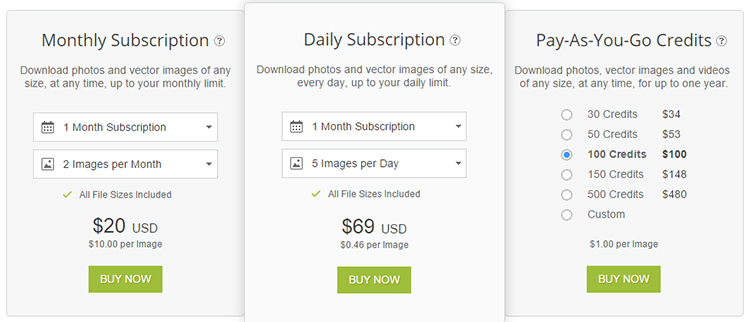
Is that not what we do with stock photos? We take a photograph that cost under $10 and use it to earn money with. Stock photos, in this case, are considered an investment. As a marketer, you have one tough job. Many people don’t like sales. It can be quite uncomfortable to ask someone for money, even if you have something you can offer in return for said money. It takes a certain eloquence – certain brand of confidence – to ask people for money.

depositphotos plans and pricing

As uncomfortable as it is to ask people for money, it still needs to be done. I’m here to ensure that your job is made just a little bit easier by using stock photos from DepositPhotos. You see, DepositPhotos has over 25 million photos organized into 36 distinct categories at your disposal to make sure that you can convey exactly the message you’re trying to communicate.

The toughest of these categories is the abstract category. In fact, the Abstract category is what we are going to focus on today. An abstract concept is one that it exists as a thought or idea but takes on no concrete form, physical or otherwise. Let’s focus on the abstract concept of how to relate to people. When you can get your product or message to relate to people on an innate level, you can have the eating out of the palm of your hand. This is best done when you advertise with stories. Storytelling is an ancient method of human engagement. Entire lives can be written down and told in a storybook format.

Your assignment is to tell a story that relates to your product or service. You can then tell people how your product or service can help them. Toward the end of the story, you can choose a photograph that depicts happiness. Happiness, like all feelings, is abstract. By associating your story and the results that can be achieved through your product or service with positive feelings, you’re relating to people on a subconscious level.

depositphotos-illustration

Do you want to influence sales? Do you want to win new buyers? This is how you do it. Make sure that your story always has a picture that invokes positive feelings in people. By making that mental association, you can use DepositPhotos to win buyers and influence sales. Make sure you use that picture – no one likes to see a wall of text.

September 4, 2015 By Melinda Ward Leave a Comment

Is a DepositPhotos Discount Worth [$] To You?

sign-up-in-depositphotosWhen you sign up for a new account with DepositPhotos, you’re in for a treat. Right now DepositPhotos is offering a seven-day free trial. Within the seven days, you’ll have the opportunity of downloading five free photos per day with no strings attached. There are no purchases, no fees and no minimum requirement. It truly is free.
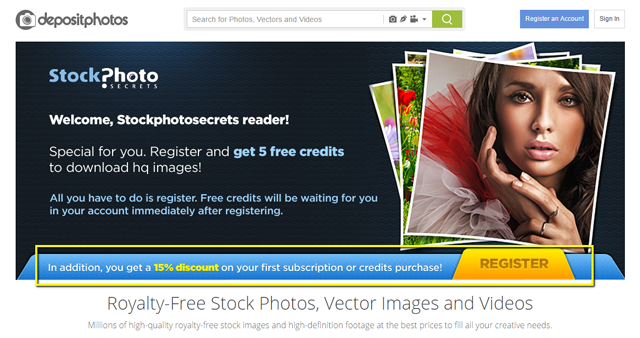
As you well know, stock photos are not always cheap. The prospect of receiving 35 free images is certainly enticing – they have millions to choose from. With over 36 categories of pictures, it will prove more difficult not to find what you look for. People spend hundreds of dollars every month subscribing to these stock photo agencies. What better way to let people truly try out a service than to take 35 images of your choice for free?

15-percent-off-in-depositphotos

The goodies don’t end there. After the seven-day free trial, you will be asked to pick a plan. This plan will carry with it a 15 percent discount on your first purchase, you can read the full details in Stock Photo Secrets. If you are a heavy user of stock photos, free images will be right up your alley.

Stock photos can be used for almost anything. The usual set of circumstances rule for royalty-free images is unlimited Web use, limited print use and no distribution rights. Most people use them for the blog, sales pages and other Internet marketing purposes.

Let’s take a look at what 15 percent means. For easy math, let’s take a look at what 10 percent means. There are people who spend over $500 per month on stock imagery. 10 percent of that is $50, so 15 percent of that is $75. It may not seem like much, but it is a significant savings. If you couple that with 35 free images, you’re saving over $100 for nothing more than becoming their customer.

depositphotos-logoRoyalty-free images do not mean free. It means you do not need to pay a royalty once you license your image and pay for it. Unlimited Web use means you can download it an unlimited amount of times without paying for it again and again. The standard license is limited. If you need to step outside the bounds of the standard license, an extended license is available.

Is the discount worth it to you? That depends – is $100 worth it to you? For many people, this is a no-brainer.

Pixelicious Photo of the Month

Recent Posts

  • What Does Royalty Free Mean for Stock Images? A Clear Guide for Businesses and Creators
  • Miami Modern Interior Design: Blending Tropical Luxury with Sleek Contemporary Style
  • DepositPhotos Review 2024: Best Stock Photo Platform for Content Creators
  • How to Use Blog Images: A Complete Guide to Boost Engagement and Traffic [2024]
  • How to Buy Alamy Stock Photos: A Complete Guide to Licensing and Pricing [2024]

Recent Comments

    Posts Archive

    • February 2026
    • April 2025
    • March 2025
    • December 2024
    • August 2017
    • March 2016
    • October 2015
    • September 2015
    • Homepage
    • About us
    • Terms of Use
    • Contact

    Pretty Chic Theme By: Pretty Darn Cute Design